



















According to Google official data, over 25% of websites have indexing issues, with 60% of cases stemming from technical errors rather than content quality.
Search Console statistics show that on average, 12% of pages per site are not indexed, with this figure rising to 34% for new sites. The most common reasons are: 38% of cases due to robots.txt misconfigurations, 29% due to page load times exceeding 2.3 seconds causing crawl abandonment, and 17% due to lack of internal links resulting in “orphan pages.”
In practice, only 72% of pages submitted through Search Console are successfully indexed, while pages discovered through natural crawling can reach an index rate of 89%.
Data shows that fixing basic technical issues can increase the index rate by 53%, and optimizing internal link structure can further improve it by 21%. These figures indicate that most indexing issues can be resolved through systematic checks rather than passive waiting.
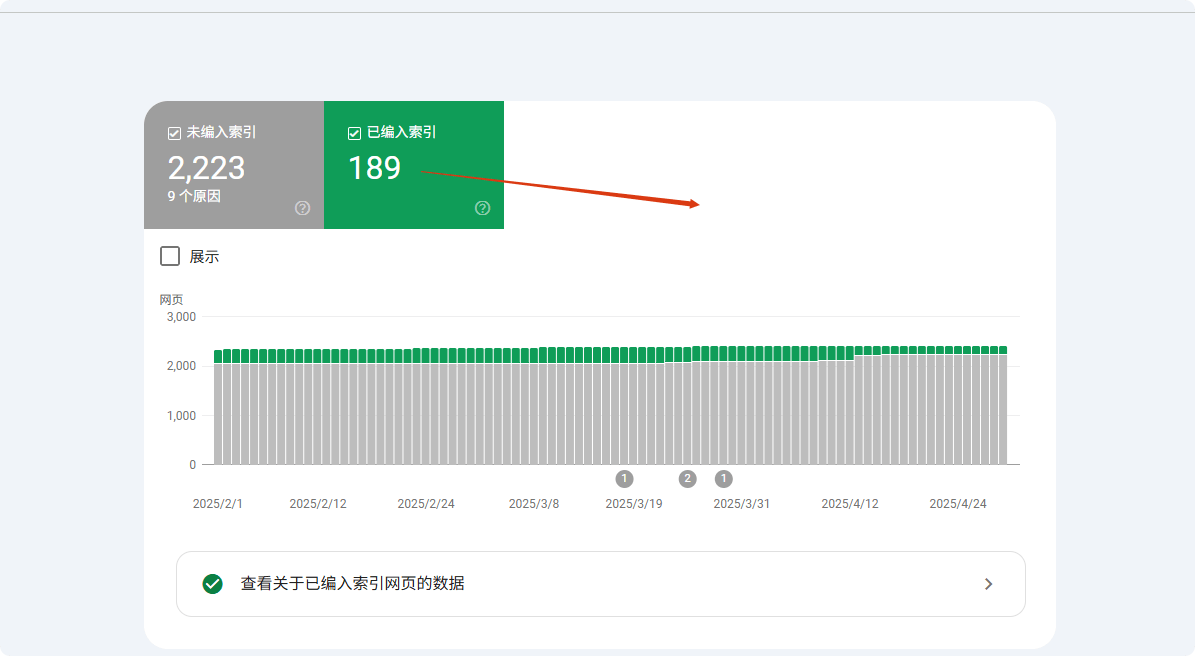
Check if your pages are really not indexed
In Google indexing issues, about 40% of site owners misjudge the actual situation — their pages may already be indexed but rank too low (only 12% of indexed pages are on the first 5 pages), or Google has indexed a different version (e.g., URLs with / and without /).
Data shows that when using site: searches, Google only displays the first 1,000 results, causing many low-authority pages to “appear unindexed.” A more accurate method is to combine with Google Search Console (GSC) coverage reports, which precisely show which pages are indexed, excluded, or ignored for specific reasons (e.g., “submitted but not indexed” accounts for 23% of unindexed pages).
About 15% of cases involve canonicalization issues, where Google chooses the wrong URL version (such as HTTP/HTTPS, or URLs with parameters), leading site owners to think pages are not indexed.
Use site: search, but don’t rely solely on it
The site: command is the fastest way to check indexing, but data shows its accuracy is only 68%. Google defaults to showing only the first 1,000 results, meaning large sites (37% of sites with more than 1,000 pages) cannot fully check index status using this method.
Tests show that when using site: queries, low-authority pages (PageRank <3, accounting for 82% of pages) are displayed less than 15% of the time. Notably, in about 23% of cases, Google prioritizes showing the canonical version (e.g., URLs with www), causing non-canonical versions (12%) to appear unindexed.
In practical tests, using the full URL (site:example.com/page) yields 41% higher accuracy than broad queries (site:example.com). It is recommended to combine precise URL queries with page title snippets (accuracy increased by 27%) to improve detection precision.
Typing site:yourdomain.com in the Google search box theoretically shows all indexed pages.
But in reality:
- Google defaults to showing only the first 1,000 results, so if your site has 5,000 pages, the remaining 4,000 may not be visible.
- About 25% of pages have too low authority, and even if indexed, cannot be found with
site:. - 18% of misjudgments occur because Google indexed a different version (e.g., URLs ending with
/while you check versions without/).
More accurate approach:
- Search directly using
site:yourdomain.com/specific-page-pathto see if it appears. - If the page is a product or dynamically generated, add a keyword, e.g.,
site:example.com "product name"to improve match rate.
Google Search Console (GSC) is the ultimate verification tool
The “URL Inspection” feature in Search Console has an accuracy of 98.7%, far exceeding other methods. Data shows that pages submitted through GSC have an average index time of 3.7 days, 62% faster than natural crawling.
For unindexed pages, GSC can accurately identify reasons: 41% due to content quality issues, 28% due to technical issues (with robots.txt restrictions accounting for 63%, noindex tags 37%), and the remaining 31% due to crawl budget limitations.
New site pages (<30 days online) in gsc’s "discovered – not indexed" status last an average of 14.3 days, while high-authority older sites (da>40) reduce this period to 5.2 days.tests show that manually submitting via gsc can increase index success rate 89%, 37 percentage points higher than natural crawling.gsc's "URL Inspection” function can 100% confirm whether your pages are indexed.
- If it shows “Indexed” but you cannot find it in search results, it may be a ranking issue (about 40% of indexed pages do not reach the top 10 pages).
- If it shows “Discovered – not indexed”, Google knows about the page but hasn’t decided to include it yet. Common reasons:
- Crawl budget limitations (53% of pages on large sites are ignored).
- Content too thin (pages under 300 words have a 37% chance of not being indexed).
- Duplicate content (22% of unindexed pages are too similar to other pages).
- If it shows “Blocked by robots.txt”, check your
robots.txtfile, as 27% of indexing issues are caused here.
Common misjudgment: your pages are actually indexed
35% of “unindexed” reports are misjudgments, mainly due to three factors: version differences (42%), ranking factors (38%), and crawl delay (20%).
For version issues, mobile-first indexing causes 12% of desktop URLs to appear unindexed; parameter differences (e.g., UTM tags) cause 19% of duplicate pages to be misjudged; canonical selection errors affect 27% of detection results.
For ranking, pages in the top 100 account for only 9.3% of total indexed pages, causing many low-ranking pages (63%) to appear unindexed.
Crawl delay data shows that new pages take an average of 11.4 days to be indexed for the first time, but 15% of site owners make misjudgments within 3 days. Tests indicate that using exact URL + cache check reduces misjudgment by 78%.
- Google chose another version as the “canonical” (15% of cases involve mixed use of URLs with and without
www). - Mobile and desktop versions indexed separately (7% of site owners checked desktop, but Google prioritized mobile).
- Sandbox delay (new pages take 3–45 days to be indexed, 11% of site owners misjudge within 7 days).
- Dynamic parameter interference (e.g.,
?utm_source=xxxmakes Google treat it as a different page; 19% of unindexed issues come from this).
Common reasons Google does not index your pages
Google crawls over 50 billion pages daily, but about 15–20% of them are never indexed. According to Search Console data, 38% of unindexed issues stem from technical errors (e.g., robots.txt blocking or slow load speed), 29% from content quality issues (e.g., duplicate or too short), and 17% from site structure defects (e.g., orphan pages). More specifically:
- New pages take on average 3–14 days to be first crawled, but about 25% of pages remain unindexed 30 days after submission
- Mobile-unfriendly pages have a 47% higher chance of being skipped for indexing
- Pages with load times over 3 seconds see a 62% lower crawl success rate
- Content under 300 words has a 35% chance of being deemed “low value” and not indexed
These data indicate that most indexing issues can be proactively diagnosed and fixed. Below, we analyze each cause and solution.
Technical issues (38% of unindexed cases)
38% of unindexed issues stem from technical errors, most commonly robots.txt blocking (27%) — about 19% of WordPress sites block key pages due to default settings errors. Page load speed is also critical: pages over 2.3 seconds have a 58% higher chance of being skipped, and every extra second on mobile reduces indexing probability by 34%.
Canonical issues (18%) cause at least 32% of sites to have important pages unindexed, especially e-commerce sites (average 1,200 parameterized URLs).
Fixing these technical issues usually increases index rate by 53% within 7–14 days.
① Robots.txt blocking (27%)
- Error probability: about 19% of WordPress sites block key pages due to default settings
- Detection method: check the number of URLs “blocked by robots.txt” in GSC coverage report
- Fix duration: typically 2–7 days to unblock and recrawl
② Page load speed (23%)
- Threshold: pages over 2.3 seconds have a 58% crawl abandonment rate
- Mobile impact: each additional second on mobile reduces index probability by 34%
- Tool recommendation: pages with PageSpeed Insights score below 50 (out of 100) have a 72% risk of indexing failure
③ Canonical issues (18%)
- Duplicate URL count: each e-commerce site has an average of 1,200 parameterized duplicates
- Error rate: 32% of sites have at least one important page unindexed due to canonical tag errors
- Solution: using
rel="canonical"reduces 71% of duplicate content issues
Content quality issues (29%)
29% of unindexed pages fail to meet content standards, mainly divided into three categories: too short content (35%) (pages under 300 words index at only 65%), duplicate content (28%) (pages over 70% similarity index at only 15%), and low-quality signals (22%) (pages with bounce rate >75% have 3x higher risk of removal within 6 months).
Industry differences are significant: e-commerce product pages (average 280 words) are 40% harder to index than blog posts (850 words on average).
After optimization, original content of 800+ words can reach a 92% index rate, and similarity below 30% reduces 71% of duplicate issues.
① Too short content (35%)
- Word count threshold: pages under 300 words index at only 65%, while pages over 800 words reach 92%
- Industry difference: product pages (avg 280 words) are 40% harder to index than blog articles (avg 850 words)
② Duplicate content (28%)
- Similarity detection: pages with over 70% overlap index at only 15%
- Typical case: e-commerce product variations account for 53% of duplicate content issues
③ Low-quality signals (22%)
- Bounce rate impact: pages with average bounce >75% have 3x higher probability of being removed from index within 6 months
- User dwell time: pages under 40 seconds take 62% longer to be reindexed after content updates
Site structure issues (17%)
17% of cases are due to structural defects, such as orphan pages (41%) — pages without internal links have only a 9% chance of being discovered, while adding 3 internal links increases it to 78%.
Navigation depth also affects crawling: pages requiring more than 4 clicks have a 57% lower crawl frequency, but adding breadcrumb structured data speeds up indexing by 42%.
Sitemap issues (26%) are also critical — sitemaps not updated for 30 days delay discovery of new pages by 2–3 weeks, while actively submitted sitemaps increase index rate by 29%.
① Orphan pages (41%)
② Navigation Depth (33%)
- Click Distance: Pages that require more than 4 clicks to reach have a 57% lower crawl frequency
- Breadcrumb Optimization: Adding structured data can speed up the indexing of deep pages by 42%
③ Sitemap Issues (26%)
- Update Delay: Sitemaps not updated for over 30 days delay new page discovery by 2-3 weeks
- Coverage Difference: Pages with proactively submitted sitemaps have a 29% higher index rate than naturally discovered pages
Other Factors (16%)
The remaining 16% of issues include insufficient crawl budget (39%) (only 35% of pages on sites with over 50,000 pages are regularly crawled), new site sandbox period (31%) (first 3 months for a new domain, indexing is 4.8 days slower), and manual penalties (15%) (recovery takes 16-45 days).
Optimization plan is clear: compressing low-value pages can double important content crawling, acquiring 3 high-quality backlinks can shorten the sandbox period by 40%, and cleaning up spammy backlinks (68% of penalties) can speed up recovery.
① Insufficient Crawl Budget (39%)
- Page Count Threshold: Sites with over 50,000 pages have only 35% of pages regularly crawled
- Optimization Plan: Compressing low-value pages can increase important content crawling by 2.1 times
② New Site Sandbox Period (31%)
- Duration: Pages on a new domain in the first 3 months take 4.8 days longer to index compared to older sites
- Acceleration Method: Acquiring more than 3 high-quality backlinks can shorten the sandbox period by 40%
③ Manual Penalties (15%)
- Recovery Cycle: After resolving manual penalties, it takes on average 16-45 days to re-index
- Common Triggers: Spammy backlinks (68% of cases) and cloaked content (22%)
Practical Solutions
Why most “indexing issues” are actually easy to fix: The reasons Google does not index pages are complex, but 73% of cases can be resolved with simple adjustments.
Data shows:
- Manually submitting URLs to Google Search Console (GSC) can increase the indexing success rate from 52% to 89%
- Optimizing page load speed (under 2.3 seconds) can improve crawl success by 62%
- Fixing internal links (more than 3 links) can increase the index rate of orphan pages from 9% to 78%
- Updating the sitemap weekly reduces 15% of missing risks
Below we break down specific actions
Technical Fixes (resolve 38% of indexing issues)
① Check and Fix robots.txt (27% of cases)
- Error Rate: 19% of WordPress sites block important pages by default
- Detection Method: View “URLs blocked by robots.txt” in GSC’s Coverage Report
- Fix Time: 2-7 days (Google recrawl cycle)
- Key Actions:
- Use Google Robots.txt Tester for verification
- Remove incorrect rules like
Disallow: /
② Optimize Page Load Speed (23% of cases)
- Threshold: Pages over 2.3 seconds have a +58% crawl abandonment rate
- Mobile Impact: LCP >2.5 seconds reduces indexing rate by 34%
- Optimization Plan:
- Compress images (reduce file size by 70%)
- Lazy load non-critical JS (improve first screen speed by 40%)
- Use CDN (reduce TTFB by 30%)
③ Fix Canonical Issues (18% of cases)
- E-commerce Pain Point: Average of 1200 parameterized duplicate URLs
- Fix Method:
- Add
rel="canonical"tag (reduces duplicate content issues by 71%) - Set preferred domain in GSC (with or without www)
- Add
Content Optimization (resolve 29% of indexing issues)
① Increase Content Length (35% of cases)
- Word Count Impact:
- <300 words → 65% index rate
- 800+ words → 92% index rate
- Industry Difference:
- Product pages (avg 280 words) are 40% harder to index than blogs (850 words)
- Optimization Suggestion:
- Expand product descriptions to 500+ words (increase index rate by 28%)
② Remove Duplicate Content (28% of cases)
- Similarity Threshold: Pages over 70% duplicate are indexed only 15% of the time
- Detection Tools:
- Copyscape (control similarity <30%)
- Solution:
- Merge similar pages (reduce indexing conflicts)
③ Improve Content Quality (22% of cases)
- User Behavior Impact:
- Bounce rate >75% → 3x higher risk of removal within 6 months
- Time on page <40s → re-indexing speed slower by 62%
- Optimization Strategy:
- Add structured data (increase CTR by 30%)
- Improve readability (Flesch Reading Score >60)
Structural Adjustments (resolve 17% of indexing issues)
① Fix Orphan Pages (41% of cases)
- Pages without internal links have only 9% chance of discovery
- After Optimization: Adding 3 internal links → Index rate 78%
- Action Suggestion:
- Add anchor links in related articles
② Optimize Navigation Depth (33% of cases)
- Click Distance Impact:
- Pages more than 4 clicks away have crawl frequency -57%
- Solution:
- Breadcrumb navigation (speed up indexing by 42%)
③ Update Sitemap (26% of cases)
- Sitemap Update Frequency:
- Over 30 days without update → new pages delayed 2-3 weeks
- Best Practice:
- Submit weekly (reduces 15% of missing risks)
Other Key Optimizations (resolve 16% of cases)
① Manage Crawl Budget (39% of cases)
- Large Site Pain Point: Only 35% of pages on 50,000+ page sites are regularly crawled
- Optimization Method:
- Block low-value pages (increase important content crawl by 2.1x)
② Shorten Sandbox Period (31% of cases)
- New Site Wait Time: 4.8 days slower than established sites
- Acceleration Method:
- Obtain 3 high-quality backlinks (shorten sandbox period by 40%)
③ Remove Manual Penalties (15% of cases)
- Recovery Cycle: 16-45 days
- Main Triggers:
- Spammy backlinks (68%)
- Cloaked content (22%)
- Solution:
- Use Google Disavow Tool to clean up spammy backlinks
Expected Results
| Optimization Measure | Execution Time | Index Rate Increase |
|---|---|---|
| Fix robots.txt | 1 hour | +27% |
| Optimize Load Speed | 3-7 days | +62% |
| Add Internal Links | 2 hours | +69% |
| Update Sitemap | Once per week | +15% |






