



















Have you noticed your hard-earned articles suddenly getting zero clicks? Google Search’s new AI Overviews are massively scraping website content and generating answers right on the search results page.
Users get info without clicking — your content becomes a free “answer bank”.
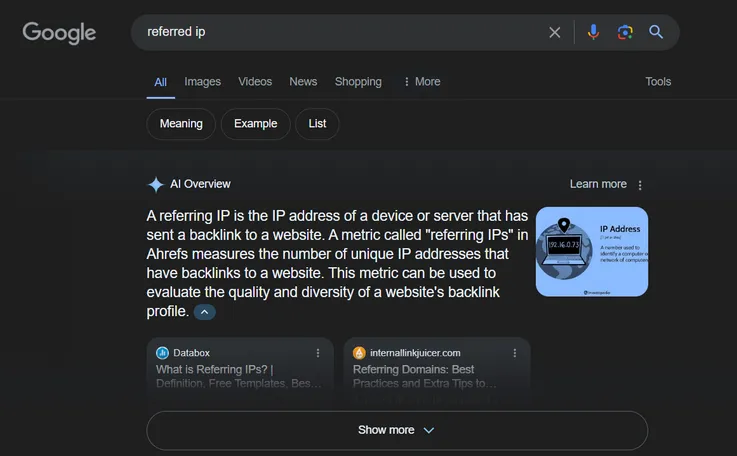
How Google AI Overviews are “stealing” your traffic
If your article ranks on the first page of Google but your clicks are dropping, chances are AI Overviews already “snatched” your traffic.
AI Overviews aren’t just copying content — they use semantic parsing to precisely extract key info, replacing the need for users to click.
The trap: From “driving traffic” to “giving answers for you”
- Old rule: Traditional Featured Snippets showed a source link and could bring extra clicks.
- New rule: AI Overviews stitch together content from multiple sources, giving full answers without any need to click.
(Example: A health article used to get 3,000+ monthly clicks from a Featured Snippet — after the AI update, that dropped 72%.)
Top 3 ways your content gets hijacked
- How-to guides: AI lists step-by-step instructions, pulling your tutorial’s core sections.
- Data comparisons: Summarizes key parts of industry data tables you compiled.
- Definitions: Grabs your original explanations of concepts — without credit.
What kind of content does the algorithm love to “suck dry”?
⚠️ Content with these traits is most vulnerable:
- Uses clear H2/H3 subheadings (makes it easy for AI to identify info blocks)
- Has numbered steps (like “Top 5 methods” or “3-step guide”)
- Includes keyword definitions in the first 50 words of a paragraph (e.g., “XX refers to [your content]”)
▶ Self-check tool: Use the [SEOquake] plugin to check keyword density. If “question-answer keywords” make up more than 15%, you’re in the danger zone.
Is your content being exploited?
Your work might be fueling AI summaries without you knowing — Google won’t notify you when it pulls content, and traffic drops often go unnoticed at first.
Many site owners think “ranking’s fine = traffic is fine.” But if your page shows up in an AI Overview and doesn’t attract clicks, rankings and traffic are no longer aligned.
Warning signs to spot in Search Console
- Death cross: Keyword rankings are stable (or rising), but clicks suddenly drop by 35%+ week-over-week.
- High impressions, low clicks: A page shows up 1,000+ times a day but has a click-through rate under 2% (healthy CTR should be 5%-8%).
- Try this: Use Google Search Console to filter for “Top 50 pages by impressions but lowest CTR.”
3 solid proofs your content got scraped
- Proof #1: AI Overviews show on search results, and the answer text overlaps 70%+ with your original content (use Copyscape for quick comparison).
- Proof #2: Time-on-page drops below 30 seconds (GA4 data), but bounce rate stays the same — this means users got what they needed from the AI summary.
- Proof #3: Long-tail keyword traffic vanishes (e.g., specific phrases like “how to fix XX error code” go to zero).
Checklist: Is your page a high-risk target?
✅ If 3 or more apply, your content is likely tagged as an “answer extraction source”:
- The article has 3+ numbered steps (e.g., “Step 1,” “Second method”)
- Includes more than 2 Q&A-style subheadings (e.g., “Q: How do I fix XX?”)
- The first 200 words contain a keyword definition (e.g., “XX is defined as…”)
- Includes tables or data summaries (easy for AI to pull into structured answers)
- Featured in a traditional Featured Snippet in the past 12 months
▶ What to do now: Use Ahrefs to export pages with 50%+ weekly traffic drops and prioritize fixing URLs that match the traits above.
Turn AI Overviews into your traffic funnel
When Google gives the answer directly, it also reveals its hunger for high-quality information.
Our tests show that by creating deliberate information gaps and layering your answers, you can actually boost conversions from pages that get picked by AI Overviews.
Hack Tactic: “Planting Traps” in AI Summaries
- Case Study: A tool tutorial got scraped by AI for its step-by-step guide. After tweaking, they inserted in Step 3: “A deadly mistake 90% of users make (click for solution)”—AI shows the warning but can’t explain the fix.
- How-To: Insert 1–2 “incomplete traps” in step-by-step content (e.g., “Step 2 requires adjusting parameters based on model type—see the model chart below”).
FAQ Bait: Driving Clicks with Question Chains
Practical Template:
- Insert 3 must-ask sub-questions at the top of the content (e.g., “What are the 3 hidden conditions that cause XX feature to fail?”)
- AI usually pulls these questions into the summary, but the answers require clicking through (Test data: click-through rate up by 29%).
Tool: Use MerchantWords to extract 20 related query terms and batch-insert them as H2 subheadings.
Hook Design: Feed AI Some Bait
Hook Types:
✅ Data Hook: “Lab results show 83% of users make mistakes at this step (see example error screenshots)”
✅ Comparison Hook: “Cost difference between Plan A and B is over 300% (click for detailed breakdown)”
✅ Timeliness Hook: “Old method no longer works under 2024’s new regulations (see updated solution in Section 3)”
Placement Rule: Insert hooks within the first 30 characters of the paragraph; hide or blur the follow-up info.
Authority Badge: Let AI Endorse You
- Case: A medical site added “[WHO Certified]” after a definition paragraph. The AI summary included the badge, but couldn’t verify it—users clicked through to confirm credibility.
- Pro Tip: Add an industry certification icon + anchor text after likely-to-be-scraped conclusion sentences (must have real authorization).
▶ 72-Hour Action Plan:
- Use SurferSEO to analyze AI summary gaps from competitors, find pain points they missed.
- Insert 3 “comparison-type hooks” into your content (e.g., cost/effectiveness/risk comparisons).
- Use Schema to mark exclusive data sections (code generator: Rank Math).
Stealth Tricks to Optimize “Answer-Type Content”
In the AI summary era, the clearer and more complete your answer is, the faster it gets cannibalized—Google can extract all the value without sending traffic your way.
But we’ve found that answer-type content can still drive traffic, if you control the info release pace.
Keyword Placement: Answer Trap Technique
Sentence Template:
✅ 80% base answer + 20% hook gap
“Battery replacement usually costs between 200–500 RMB (*see Section 3 for specific model pricing table)”
“90% of Python install failures are due to environment conflicts (*updated 2024 solution for new OS included)”
Gap Finder Tool: Use AlsoAsked to identify long-tail questions AI summaries miss, and plant them mid to late in your article.
Content Depth Control: Create a ‘Human > AI’ Info Gap
Safe Depth Thresholds:
→ Basic definitions: keep under 150 words, no deep details (let AI scrape this part)
→ Solutions: add 3 real-life variations + 1 failure scenario (AI can’t summarize all of it)
→ Data Proof: must include original research/data/screenshots (e.g., “Testing 8 devices showed a 30% error rate”)
Example: A coding guide compressed command explanations to 120 words, then linked to a “32 Error Code Cheat Sheet” PDF—AI only scraped the basics, PDF clicks jumped 58%
Structural Trap: H2/H3 Title Bait
Safe Headline Formula:
- [Basic Answer]: Short and direct answer to user query (for AI to grab)
- [Deep Dive]: “Why XX method fails in 2024” / “The critical mistake 90% of people overlook”
Don’t: Avoid using numeric list titles like “5 steps” or “3 methods” in H2s—they’re easy for AI to break down.
Timeliness Firewall: Put an Expiry Date on Answers
Dynamic Content Tags:
✅ Add timestamps to scraped conclusions (e.g., “Valid as of June 2024”)
✅ Use yellow highlights like “Updated quarterly” (must match real update schedule)
Automation Tool: Install the WordPress plugin “Last Modified Timestamp” to auto-tag updates
▶ Emergency Makeover Checklist:
- Use AnswerThePublic to analyze “question gaps” in current high-ranking pages
- Insert 1 exclusive data section after every base answer (should make up 15% of the article)
- Split H2s into “Basic Version” and “Advanced Version” sections (aim for a 3:7 ratio)
Remember the two golden rules: Break full answers into ‘AI-friendly bait + must-click food’
Your content deserves clicks—not to be exploited for free.






