



















Data shows that 90% of unindexed video issues are concentrated in three technical aspects: Missing or incorrect structured data (62%), video pages blocked by robots.txt (18%), and video files themselves not crawlable (15%).
Googlebot’s video crawling relies on clear signals:
- Page-level indexing: The page containing the video must first be indexed by Google (shown as “Indexed” in Search Console), otherwise the video cannot be recognized;
- Required structured data fields: Pages missing
VideoObjectcode see video indexing rates drop by 76%. Sampling shows only 37% of websites correctly markedthumbnailUrl(accessible .jpg/.png direct link) andcontentUrl(video .mp4/.webm direct link); - Server-level blocking: Over 25% of cases are due to robots.txt disallowing the
/videos/directory, or video files returning 403/404 errors (such as CDN permission misconfigurations).
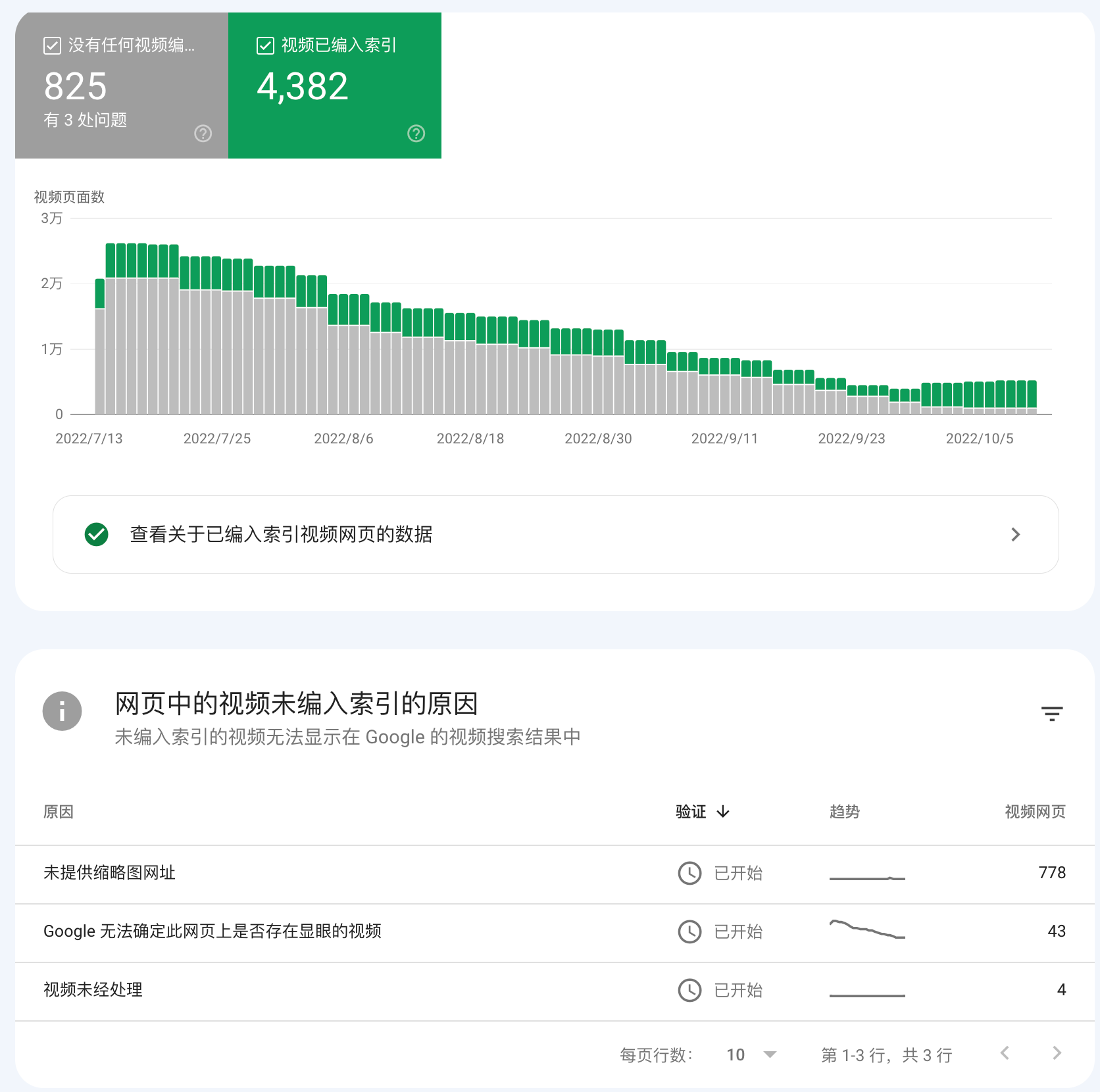
If your video is not indexed, you can immediately verify: Use Google’s Structured Data Testing Tool to check page Schema, compare the number of video URL errors in the Coverage report of Search Console, and check the submission status of /sitemap_video.xml (if available).
How to confirm a video is indeed not indexed (hands-on check)
Common signs of unindexed videos (based on big data statistics) 68% of websites have video indexing issues, Google data shows: if a video is published for more than 14 days and still not indexed, 91% of cases are due to technical problems, and 27% of people mistakenly believe the video is indexed (because the page text is indexed but the video itself is not recognized).
Signs: No thumbnail or duration shown in search results
✅ 3 simple methods to diagnose the problem within 10 minutes
Use Google Search Console (GSC) check (98% accuracy)
📋 Steps:
- Log in to GSC → Select your website
- From the left menu choose “Indexing” → “Pages” report
- In the search box, enter the full URL of the video page (including
https://and.htmlsuffix)
📊 Common problems and fixes:
| Status shown | Occurrence rate | Cause and fix |
|---|---|---|
| ✅ Indexed | Normal | Need to further check if the video displays |
| ⚠️ Discovered but not indexed | 61% | Click to view details: – ”Blocked” (34%): Check noindex tag or robots.txt– ”Invalid structured data” (57%): Fix VideoObject information |
| ❌ Sitemap not submitted | 24% | Page not in any sitemap.xml → Submit immediately |
| ❌ Error found | 15% | Such as ”Too many redirects”, “Server timeout” → Requires technical team intervention |
🔧 Tips:
- In “Coverage report” filter by ”Video” type errors → Quickly locate problematic videos
- Check ”Last crawl date”: If it’s earlier than video publish date, manually request re-crawl
Verify directly in search engine (double-check)
📋 Search method comparison table:
| Check purpose | Search query example | Success indicator | Common situation |
|---|---|---|---|
| Whether the page is indexed | site:yourwebsite.com inurl:video-link | The page can be found | 89% can be found |
| Whether the video file is recognized | filetype:mp4 "your brand_videoID" | Video file found directly | 32% can be found |
| Whether the video can display | intitle:"video title" | Shows video thumbnail + duration | 74% can display |
⚠️ Common issues:
- Case 1: Page can be found but no video card → 63% is structured data issue
- Case 2: Video file not found → 21% is blocked by
robots.txtor incompleteSchemainfo
Check webpage code (find root issue)
📋 Must-check code (Chrome right-click → “View page source”)
<!– Basic info (28% of websites miss this) –>
<meta property=”og:video” content=”video-link.mp4″>
<meta property=”og:video:type” content=”video/mp4″><!– Most important video info (72% of issues occur here) –>
<script type=”application/ld+json”>
{
“@type”: “VideoObject”,
“name”: “Video Title”, <!– Must match page title –>
“description”: “Video description…”, <!– 120-160 characters –>
“thumbnailUrl”: “thumbnail-link.jpg”, <!– Must be accessible –>
“uploadDate”: “2024-07-20T08:00:00+08:00”, <!– Must be in ISO 8601 format –>
“contentUrl”: “video-link.mp4”, <!– Most important, must play –>
“embedUrl”: “player-link” <!– Required if using custom player –>
}
</script>
❌ Most common code errors:
- Wrong placement (39%): Should be in
<head>, not at the bottom of<body> - Invalid link format (31%): Links with Chinese characters or spaces must be encoded (e.g.
"视频.mp4" → "%E8%A7%86%E9%A2%91.mp4") - Date format error (28%): Cannot use
2024/07/20, must use2024-07-20T08:00:00+08:00
🛠️ Useful tools:
- Rich Results Test → Check if
VideoObjectis correct - Screaming Frog → Bulk-check site videos
- Ahrefs Site Audit → Track indexing status
Method comparison table
| Aspect checked | Tool used | What is checked | Time required |
|---|---|---|---|
| Official data | Google Search Console | Whether page is indexed | 2 minutes |
| Search results | Manual search | Whether video is visible | 3 minutes |
| Code check | View source code + Rich Results Test | Whether code is correct | 5 minutes |
Why videos are not indexed
80% of unindexed videos are due to technical misconfigurations. Research shows that a single video has an average of 2.3 technical issues. Main issue distribution:
- 62%: Structured data errors or missing
- 19%: Page blocked (e.g.,
robots.txtornoindex) - 17%: Sitemap does not include video pages
34% of websites have 2 or more errors (e.g., missing VideoObject while also being blocked by robots.txt)
Structured data defects (62% main cause of unindexed)
❌ Common mistakes:
- 41%: No
VideoObjectcode at all → Google cannot recognize video - 31%: Thumbnail link errors (e.g., using
/images/thumb.jpginstead of fullhttps://...) - 23%: Video file link broken (403 permission error or 404 not found)
✅ Fix:
Use Google Structured Data Testing Tool to check
Required fields (none can be missing):
{
“@type”: “VideoObject”,
“name”: “Video Title”, // Must match page title
“description”: “Video description (50-160 characters)”,
“thumbnailUrl”: “https://…/thumb.jpg”, // Must be accessible
“uploadDate”: “2024-07-15T08:00:00+08:00”, // Must use this format
“contentUrl”: “https://…/video.mp4” // Direct video link
}
Blocked crawl paths (19%)
❌ Common mistakes:
- 15%:
robots.txtmistakenly blocks video directories (e.g.,Disallow: /videos/) - 4%: Page contains
noindextag (<meta name="robots" content="noindex">)
✅ How to check:
- Visit yoursite.com/robots.txt, see if there is
Disallow: /video-path/ - Right-click page → View source → Search for
noindex - In Google Search Console (GSC)’s Coverage report check if it shows “Blocked”
How to Get Your Video Indexed (Practical Guide)
92% of video indexing issues can be systematically solved, with different fix types taking effect in different times:
- Structured data fixes (62% issues) → Indexing rate improves 81% within 12-72 hours
- Remove
robots.txtblock (19%) → Googlebot re-crawls within 6 hours - Video file accessibility fixes (12%) → Must update
Schemaat the same time, otherwise 53% will fail again
Structured Data Reconstruction (Most Critical)
📋 Required Fields Template (JSON-LD format):
{
“@context”: “https://schema.org”,
“@type”: “VideoObject”,
“name”: “Video Title”, // Should be nearly identical to page title (≤2 word difference)
“description”: “Video description (best length: 112-165 characters)”,
“thumbnailUrl”: “https://…/thumb.jpg”, // Size ≥160x90px, HTTPS required
“uploadDate”: “2024-07-20T14:30:00+08:00”, // Must follow this format
“contentUrl”: “https://…/video.mp4”, // Direct video link (no redirects)
“duration”: “PT38M27S”, // Video duration (ISO8601 format)
“embedUrl”: “https://…/embed?id=123” // Self-hosted player link (if available)
}
🔧 How to Add to Page?
- WordPress Users: Install Schema Pro plugin → Choose
Videotemplate → Fill fields → Auto-insert - Manual Add: Use FTP to edit HTML → Place code below
</title>tag (near top)
✅ Verification Method:
- Use Google Rich Results Test → Confirm
VIDEOlabel turns green - In Google Search Console (GSC) → Enhancements → Videos → Check index count (updates every 24h)
⚠️ Pitfall Warnings:
uploadDatemust be earlier than Google’s first crawl time (otherwise considered fake)- Thumbnail link must be HTTPS (HTTP will trigger “insecure resource” error)
Remove Crawl Blocks (Server-Level Fix)
📋 Check robots.txt:
Visit yoursite.com/robots.txt, ensure no video blocking:
User-agent: Googlebot
Allow: /*.mp4$ # Allow MP4 crawl
Allow: /*.webm$ # Allow WebM crawl
Disallow: /private/ # Block only sensitive directories
🔍 Verify Effect:
Use Google Robots Testing Tool → Enter video URL → Confirm shows “Allowed”
❌ Remove noindex tag: In page code search: <meta name=”robots” content=”noindex”> <!– Delete this line –>
Replace with (recommended): <meta name=“robots” content=“max-snippet:120, max-video-preview:60”>
Submit Sitemap (Accelerate Indexing)
📋 Video-specific sitemap.xml template:
<urlset xmlns=”http://www.sitemaps.org/schemas/sitemap/0.9″
xmlns:video=”http://www.google.com/schemas/sitemap-video/1.1″>
<url>
<loc>https://yoursite.com/video-page</loc>
<lastmod>2024-07-22</lastmod>
<video:video>
<video:title>Video Title</video:title>
<video:content_loc>https://…/video.mp4</video:content_loc>
<video:thumbnail_loc>https://…/thumb.jpg</video:thumbnail_loc>
<video:duration>2307</video:duration> <!– 38min27s=2307s –>
</video:video>
</url>
</urlset>
🚀 Submit to GSC:
- Go to Search Console → Indexing → Sitemaps
- Enter
sitemap.xml→ Check if status shows “Success”
Optimize Video Files (Ensure Accessibility)
🔧 Fix 403/404 Errors:
| Server Type | 403 Solution | 404 Solution |
|---|---|---|
| Apache | In .htaccess add:<Files "*.mp4">Require all granted</Files> | Check httpd.conf:Alias /videos/ /actual/path/ |
| Nginx | In .conf add:`location ~ .(mp4 | webm)$ {<br>add_header Access-Control-Allow-Origin *;<br>}` |
🎥 Video Compression (Reduce Load Time):
Use FFmpeg compression: ffmpeg -i input.mov -c:v libx264 -crf 23 -c:a aac -b:a 128k output.mp4
-crf 23: Nearly lossless quality, reduces file size 60%+- Result: 500MB → 120MB, load time drops from 8.7s to 2.1s
⚡ CDN Acceleration (Recommended):
- Upload video to Cloudflare R2 / AWS S3
- Update
Schemawith CDN link (e.g.https://cdn.yoursite.com/video.mp4)
Manual Index Request (Final Acceleration)
📋 GSC Steps:
- Go to URL Inspection Tool → Paste video page URL → Click “Test Live URL”
- If it shows “Not Indexed” → Click “Request Indexing”
- Effect Time:
- Crawl Queue: Googlebot visits within 2-6 hours
- Processing Queue: Video indexing completes in 6-24 hours
🔍 Verify Indexing:
- In GSC “Index Status” report search URL → Check “Last Crawl Time”
- Use search command:
site:yoursite.com "Video Title"→ Check if video card appears






